Set up smart inbox rules
Not every message fits an automation — a complaint, a partnership offer, a question you'd rather answer yourself. Inbox rules watch for exactly the kind of message you describe, and flag it for you instead of letting it slip by unnoticed.
Which plan you need: Smart inbox rules come with paid plans, and each plan allows a set number of rules. The free plan doesn't include them — pricing lists them.
When a rule actually runs
Rules only ever look at a message once none of your automations replied to it — so a rule never competes with or overrides an automation, it just catches what's left over.
Create a rule in 4 steps
- Go to Inbox rules and choose "+ New rule." Every rule applies across your whole workspace, not just one account.
- Describe what it should catch, in plain language. For example: "messages asking about wholesale or bulk orders." No keyword list to maintain — just describe the kind of message.
- Choose where it applies — DMs, comments, story replies, live comments, or any mix — and how confident Zaptium should be before it counts as a match (broader catches more, but with more false positives; stricter catches less, but with more certainty).
- Set a label and a priority so a matching conversation is easy to spot in your priority inbox, then save.
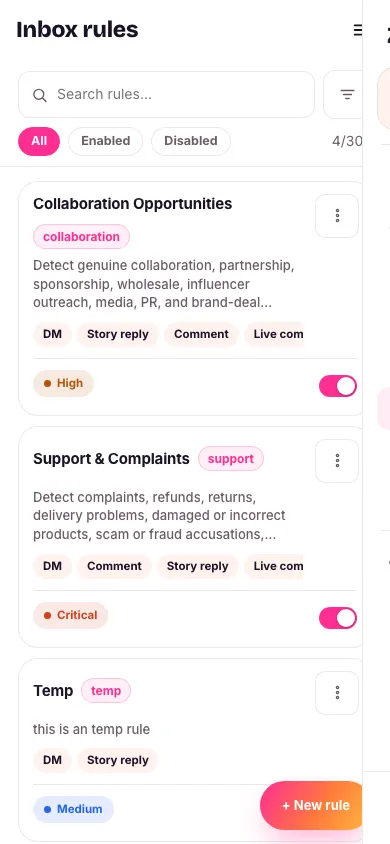

Every new workspace starts with two example rules already there — one for collaboration requests, one for support complaints — turned off by default. Edit and turn one on, or delete it and write your own.
You can optionally require the sender to be verified, or have a minimum follower count, on rules that apply to DMs or story replies — Instagram doesn't expose that information for comments, so this option only shows up where it's actually usable.
What's next
Whatever a rule catches lands in your priority inbox — that's where you actually read and reply to it.
Never miss the messages that matter
No card needed. Connect your account and go live in minutes.
Start free