Set up your first comment → DM automation
This is the classic Instagram play: someone comments a keyword on your post, and they instantly get your link in their DMs. Here's how to build it in Zaptium — and keep it safe.
Before you start
You'll need your Instagram account connected. If you haven't done that yet, follow How to connect your Instagram account safely first (it takes about two minutes).
Build it in 6 steps
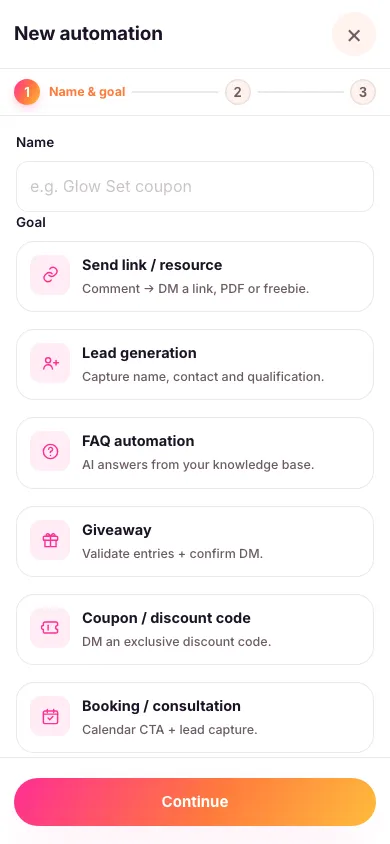
- Create a new automation, name it, and pick what you want it to do. For this one, "Send link / resource" is the right choice.
- Pick the exact posts it replies on. Tick the specific posts, reels or stories you want it working on. There's no "reply on everything" setting — an automation only ever replies on the content you attach to it, so a comment on anything else you've published is simply left alone. See choosing which posts an automation replies to.
- Choose your keyword. The word people will comment — for example LINK. Capitals don't matter, so "link", "Link" and "LINK" all work. You can also let people trigger it by DMing you a word instead of commenting — see below.
- Decide where your reply lands, using the Move conversation to DM switch, and whether a short opening message goes first — see below.
- Write your reply. This is the message that gets sent — publicly on the comment or privately in DM, depending on the switch above. Add your link as a tidy button, a product card, or a file when it's going to DM, and it arrives exactly as you built it; a public reply is plain text only.
- Turn it on. Activate the automation. From now on, every new matching comment gets your reply — 24/7.

Public reply or private DM
This one switch decides where your reply is delivered — not which message gets used. The message you wrote is the one they receive either way.

- On: all that appears under their comment is the short public teaser you write there — something like "Just sent you a DM 👀", which nudges everyone else reading the thread. Your actual reply, and everything after it — a follow-first prompt, any questions, your final message, any AI answers — is sent privately to that one person.
- Off: your reply is posted publicly on the comment instead, and the conversation stays out in the open.
Buttons, product cards and files can only be sent privately, so those options are only available with the switch on. There's no separate "DM version" of your message to fill in — this switch is what chooses where the message you already wrote goes.
Sending a short opening message first (optional)
With your reply going to DM, the Opening message section lets you choose what someone gets first. Off, which is how every new automation starts, your reply goes straight to their DMs — buttons, product cards and file included. On (look for Send an opening message first), they first get a short, plain message like "Hey Aisha! Reply here and I'll send it right over 💛", and your reply follows the moment they write back, any time within 7 days of their comment.

Why bother? Instagram can refuse buttons, pictures and files sent to someone who doesn't follow you, and since a comment only ever gets one private reply, a refused one is lost for good. Your regular followers won't run into this, but it's common on trial reels and ads, where most people commenting don't follow you yet — so turn it on there. While it's off and your reply has buttons, cards or a file, the setup screen reminds you.
Write a few versions of the opening message — Zaptium picks one at random each time, so nobody gets a copy-paste message. Keep it to plain text, with no links and no discount code: those come in your reply.
If Instagram starts refusing your replies on an account anyway, Zaptium turns this on for that account by itself for a week to keep it safe, and tells you on your dashboard. Replies that are just text still go straight away, and it turns off on its own.
Let people trigger it by DMing you a word
Comments aren't the only way in. Give the automation a word in its DM routing keyword box, and anyone who messages you that word gets the same reply straight away — no post, no comment, nothing attached needed. It's the one thing an automation can do without any content behind it, because the message comes to you directly.

Then tell people about it — "DM me EBOOK" in your caption, your story or your bio. Use a single word with no spaces. It has to be the whole message, but capitals and punctuation around it don't matter, so "EBOOK" and "ebook!" both work while "EBOOK can you send it?" doesn't. Each word can only belong to one automation in your workspace, so give every automation its own.
Asking for a follow first (optional)
Want people to follow you before they get the link? Turn this on and your opening message always goes first, asking them to follow you and reply. When they reply, Zaptium checks the follow with Instagram for real before sending; anyone who hasn't followed yet gets a nudge with an I Followed button. It needs the reply going to DM, since a tappable button can't live on a public comment. See requiring a follow before you reply.
Zaptium follows Instagram's rules so your account stays safe: just one private reply per comment, follow-up messages only inside the window Instagram allows after someone replies, a small random pause before every automated send so it never looks robotic, built-in limits on how fast messages go out, and your opening message sent first on its own if Instagram starts refusing your replies. If a conversation goes on to collect someone's details, they're asked to agree first and can say no — and once it's done, they get a link to their own private page where they can withdraw their consent or ask for their details to be deleted. There's more on all of it in how Zaptium keeps your account safe.
Every goal in Zaptium — not just this one — can also answer general questions using AI, grounded in your own content, on plans that include AI. If someone asks something instead of just commenting the keyword, turn on "Reply with AI" in the automation's setup and point it at a knowledge source.
What's next
That's your first automation live. From here you can answer FAQs with AI, run giveaways, or collect leads — all from the same dashboard. Browse the rest of the guides for more.
Build your first automation free
No card needed. Connect your account and go live in minutes.
Start free