Choose which posts an automation replies to
Every automation needs to know which of your posts, reels or stories it should actually reply on. This is the second step of building any automation, and it works the same way no matter which goal you picked.
There's no "reply on everything" option, and that's deliberate. An automation only ever replies on the exact posts, reels and stories you attach to it here — a comment on anything else you've ever published is simply left alone. It means a keyword you use on one campaign can't accidentally fire on an old post, and you can run different automations on different content at the same time without them tripping over each other.
How the picker works
- Browse everything you've already posted across every connected Instagram account, newest first, right inside the setup screen — nothing to copy or link manually.
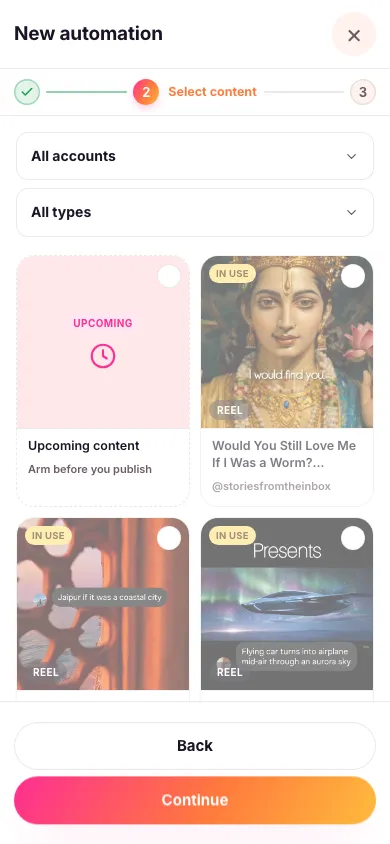
- Narrow it down. Filter by account (if you have more than one connected) and by type — posts, reels or stories.
- Tick everything you want this automation to reply to. You can pick as many as you like, across accounts, in one go. Keep scrolling and use "Load more" to reach anything further back.
- Continue to the next step once you've picked everything relevant.

Anything already claimed by another automation shows up greyed out with a note on who's using it — you can see it, but you can't pick it too. One piece of content can only ever belong to one automation at a time, so replies never collide or double up.
Picking the content isn't picking where the reply lands
These two are separate decisions. What you tick here is which posts an automation listens on; a switch called Move conversation to DM, further along in the setup, decides where its reply is delivered. With that switch on, all anyone sees under the comment is a short public teaser and the real reply goes privately; with it off, the reply is posted publicly on the comment. Either way it's the same message you wrote — the switch changes the destination, not the words.
The one thing that works without a post
There's a single exception to all of this: an automation can also be given a word people can DM you directly. That arrives as a message rather than a comment, so there's no post for it to be attached to — it works whether or not you've picked any content here. See letting people trigger it by DMing you a word for how to set that up.
What's next
Haven't posted the content yet? See setting up an automation before you post to have it ready the moment you go live instead.