Let people trigger your automation by DMing you a word
A comment isn't the only way into an automation. Every automation also has a DM routing keyword — a separate word that starts the same automation the moment someone messages it to you directly, with no post or comment involved at all. This guide covers how it works in general; each automation's own guide shows the specific example word used there.
Set it up in 3 steps
- Open your automation's setup and find the "DM routing keyword" box. It's separate from any comment keyword you've set — an automation can have both at once, or just one.
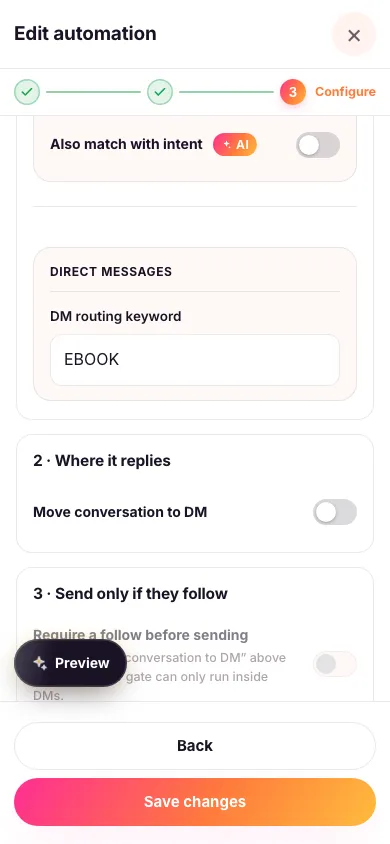
- Give it a word. Use a single word with no spaces, like EBOOK. Anyone who messages you just that word gets the automation's reply straight away. Capitals and punctuation around it don't matter — "ebook" and "EBOOK!" both work — but a longer message such as "EBOOK please send it over" doesn't start the automation.
- Tell people about it. "DM me EBOOK" works in a caption, a story, or your bio — anywhere you'd otherwise put a link. Each word can only belong to one automation in your workspace, so give every automation its own.

It works without any post attached
Every other way into an automation depends on the exact posts, reels or stories you've attached to it — a comment on anything else is simply left alone. The DM routing keyword is the one exception: because the message comes to you directly instead of landing under a post, it works whether or not you've picked any content at all, and it's the one thing that works before you've even published anything.
The reply always arrives in DM
Every automation also has a Move conversation to DM switch, which normally decides whether a comment-triggered reply posts publicly or privately. That switch has nothing to reply to when someone starts the conversation by DMing your keyword — there's no comment underneath it — so the reply always arrives in DM, whichever way the switch happens to be set.
Buttons, product cards and files need a private message to carry them, so anything richer than plain text only ever works this way anyway — a DM-started conversation gets the same rich reply a comment-started one gets once its switch is turned on.
Everything else still applies
A conversation that starts this way still goes through every other option that automation has configured — a follow-first requirement, qualifying questions, an AI fallback answer, the works. Zaptium just skips straight to checking those, since there's already a private conversation open rather than needing to send a prompt first.
What's next
Head to the guide for the specific goal you're setting up — sending a link, collecting leads, sending discount codes, and the rest of the guides all show their own DM routing keyword in context.