Set up an automation before you've even posted
Instagram doesn't let Zaptium see a post before it's published, so you can't pick "tomorrow's reel" from the list. Instead you do it in two separate goes: build the automation whenever you like, then — in the minute before you actually publish — tell it to start watching. Your next post gets attached to it on its own, and the automation switches itself on at the same moment.
How it works, in order
- Build your automation as normal — goal, keyword, reply — right up to the content step. This includes an optional DM routing keyword, if you want people able to trigger it without commenting at all.
- On the content step, choose "Upcoming content" instead of picking from what's already published. Normally an automation can't be saved without content attached to it; this is the option that lets you save one with nothing attached yet.
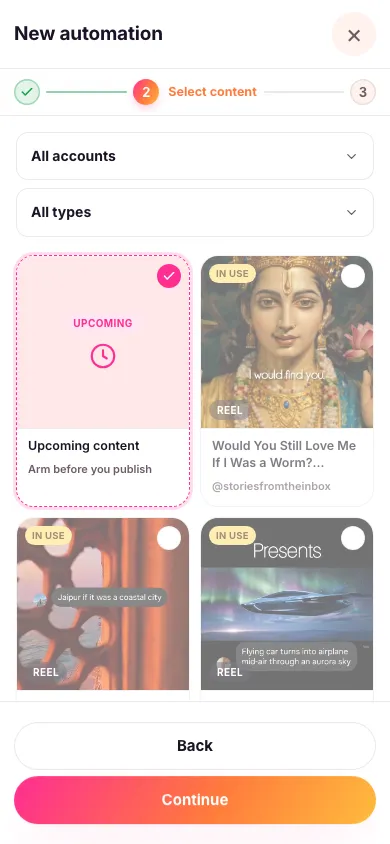
- Finish setup and save. It's now sitting paused with nothing attached. Nothing is happening yet — it is not watching for anything, and it won't be until you do the next step.
- Right before you publish, start the watch. Find the automation in your list and look for the Upcoming content button on its card. Pick the Instagram account you're about to post from and the type of thing you're posting — post, reel, story or live — then start it watching. Do this in the minute before you publish, not the night before.
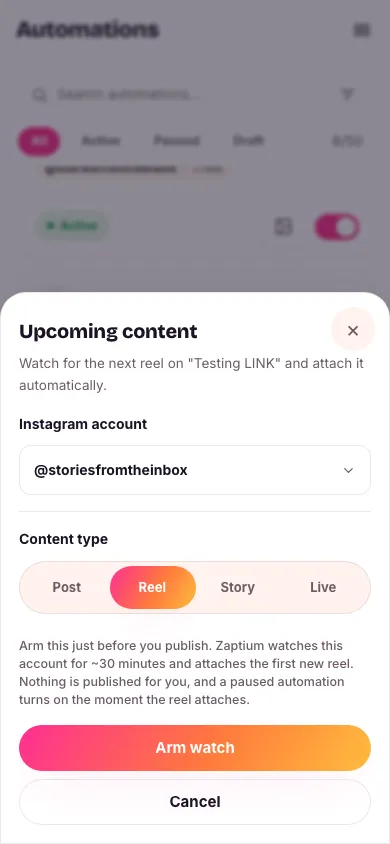
- Now publish. The next matching post, reel, story or live you put out on that account gets attached to the automation automatically — usually within moments — and the automation goes from paused to running in the same breath.


The watch only lasts about 30 minutes. If you start it and then don't publish inside that window, it simply expires: nothing gets attached, nothing breaks, and the automation stays paused. You'd just start the watch again next time you're ready to post. This is the one thing worth remembering — start the watch when you're genuinely about to hit publish.
Any automation can watch for your next post
These are two independent things. Choosing "Upcoming content" while building is only about being allowed to save an automation with no content attached. Starting a watch is available on any automation in your list — including one that's already happily replying on posts you picked by hand. Point it at your next reel and it'll pick that up too.
Only one automation can be watching for the same account and the same content type at once, though. If you try to start a second watch for, say, the next reel on the same account, Zaptium refuses it — two automations can't both be waiting to claim the same post.
Live is a bit different
A live broadcast is spotted by the fact that it's actually live, not by being newly published. So if you start a watch for a live while you're already broadcasting, it still attaches — you don't have to have set it up first. When the broadcast ends, it detaches itself again automatically.
What's next
See choosing which posts an automation replies to for the more common case of picking something you've already published.
Have your next post ready before you publish
No card needed. Connect your account and go live in minutes.
Start free