Send discount codes automatically
Give people a reason to comment or DM you by sending a discount code the instant they do. The "Coupon / discount code" goal handles the delivery — you decide whether everyone gets the same code, or each person gets their own.
Set it up in 5 steps
- Create a new automation and choose "Coupon / discount code."
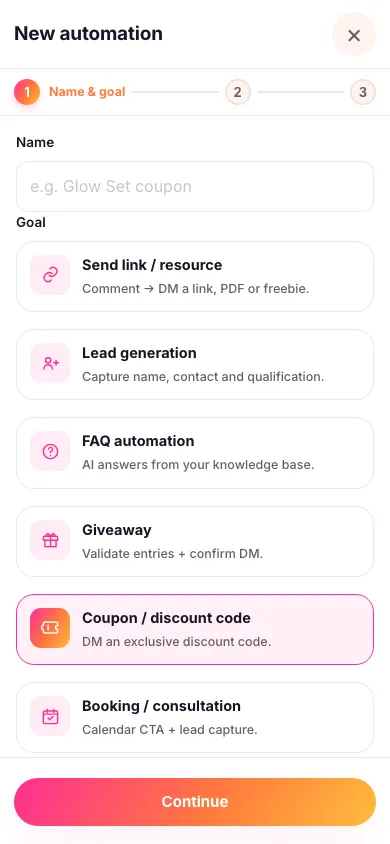
- Choose exactly which posts it replies to and pick your keyword. An automation only ever works on the content you attach to it — it never watches your whole account. You can also let people claim it by DMing you a word instead — see below.
- Choose how codes are delivered: the same code for everyone (type it in once), or a unique code per person (upload a spreadsheet of codes and Zaptium hands out one each, never repeating).
- Write the DM. Drop your code anywhere in the message using the code placeholder, and it fills in automatically for each person.
- Turn it on. From now on, every matching comment or DM gets a code sent straight to their inbox.

With unique codes, if the imported list ever runs out, the automation simply won't have a code left to send — worth keeping an eye on the count if a post is doing well.
Let people claim it by DMing you a word
Give the automation a word in its DM routing keyword box — say SALE20 — and anyone who messages you that word gets a code straight away, with no post or comment involved. That makes "DM me SALE20" a line you can put in a story, a caption, or your bio.
Use a single word with no spaces. It has to be the whole message, but capitals and punctuation around it don't matter, so "SALE20" and "sale20!" both work while "sale20 please" doesn't. Each word can only belong to one automation in your workspace, so give every automation its own.
Where the code lands
Look for the Move conversation to DM switch. It decides where the message you wrote is delivered, not which message gets sent — and for a discount code you want it on. With it on, all anyone else sees under the comment is a short public teaser, and the code itself goes privately to the person who asked. Tappable buttons like "Redeem now" also need it on, since only a private message can carry them.
Asking someone to comment their code for the world to see is a bad idea, so Zaptium deliberately won't let you put the code in a public comment reply — the code only ever appears in the private message.
Every goal in Zaptium — not just this one — can also answer general questions using AI, grounded in your own content. If someone asks a question about the offer instead of just commenting the keyword, turn on "Reply with AI" in the automation's setup and point it at a knowledge source.
What's next
Discount codes work well paired with a giveaway or as the reward for requiring a follow first.
Send your first code automatically
No card needed. Connect your account and go live in minutes.
Start free