Collect leads automatically, the consent-first way
Want to turn interested comments into a real list of contacts — name, email, phone, whatever you need to follow up? The "Lead generation" goal does exactly that, over DM, always asking permission first.
Which plan you need: Lead generation needs a paid plan that includes AI, since AI reads each answer to file it under the right detail. The free plan doesn't include it — pricing shows which plans do.
Set it up in 5 steps
- Create a new automation and choose "Lead generation."
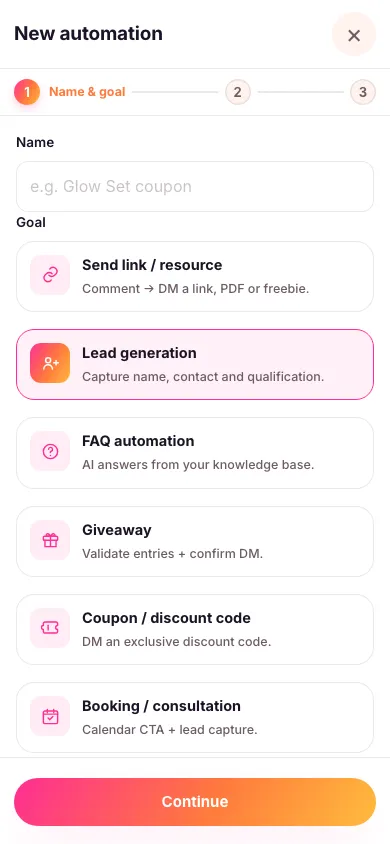
- Choose exactly which posts it replies to — the specific posts, reels or stories you want it working on, or your next upload. It only ever replies on the content you picked; a comment on anything else is left alone.
- Pick your keyword — the word people comment to start the conversation. You can also let people trigger it by DMing you a word instead — see below.
- Fill in your permission wording and your questions. That's the whole rest of this guide, below.
- Turn it on. From now on, a matching comment starts the conversation automatically, and every completed answer set shows up in your Leads list.

Let people trigger it by DMing you a word
As well as a comment, you can give this automation a word in its DM routing keyword box — say INFO. Anyone who messages you that word starts the same conversation, with no post or comment involved at all. Then tell people to use it: "DM me INFO" in your caption, your story, or your bio.
Use a single word with no spaces. It has to be the whole message, but capitals and punctuation around it don't matter, so "INFO" and "info!" both work while "INFO can you send me details?" doesn't. Each word can only belong to one automation in your workspace, so give every automation its own.
Everything personal happens in DM
Because this goal collects personal details, the Move conversation to DM switch stays on: nobody's phone number should end up in a public comment thread. All anyone else sees under the comment is a short public teaser like "Just sent you a DM 👀" — the permission conversation, the questions, the answers, and your final message are all private.
Asking permission — Zaptium handles the conversation
You can't just start asking someone for their phone number. In India this is the law, and Zaptium runs the whole permission conversation for you before a single question is asked. You fill in the wording; Zaptium does the asking.

Here's what the person actually goes through, in order:
- An age check comes first. Before anything at all is collected, they're asked to confirm they're 18 or over. If they say they're under 18, the conversation stops right there — nothing is asked and nothing is kept. You supply a contact detail to show them instead, so a younger follower still has a way to reach you.
- Then they're shown a short notice. It says what your business is called, what you'll use the details for, and how long you'll keep them. Every one of those is yours to fill in: your business name, a plain sentence about the purpose ("to contact you about your property enquiry"), and a slider for how many months you keep the data. Pick the shortest time that actually works for you — that's what the law expects.
- Your privacy policy and terms appear as buttons on that notice, if you add the links. Anyone can tap through and read them before deciding.
- They have to tap a button to agree. Not type "yes", not stay silent — an actual tap. Only then does the first question get sent. If they never respond, the conversation quietly ends after three days.
Setting up your questions
Add up to 6 questions — whatever you actually need to qualify or contact someone. Each one is a short text answer, an email, a phone number, or a multiple choice, and you pick which as you write it.

All the questions send together as one numbered message, so nobody has to sit through a slow back-and-forth quiz. If someone answers a multiple-choice question with something that isn't one of your options, Zaptium notices and asks them to pick a real one.
Offering it in more than one language
You can run the same conversation in several languages. Pick which ones on the row of language chips — your main language is marked as the primary one — and the person is simply asked, with buttons, which language they'd like before anything else happens.
Once you've added a language, a tab appears for it. On that tab you write the translation of each question and of your opening message. Anything you leave blank falls back to your main language, so a half-finished translation never leaves someone staring at an empty message.
They can always say no
Nobody is asked a single question until they've agreed. If someone would rather not share their details, they simply don't tap the agree button — nothing is asked and nothing is kept. The same goes if they say they're under 18, or if they just never reply: the conversation quietly closes on its own after three days.
Nothing is held against them either — if they message you again later, they simply start fresh.
What they get at the end
When the conversation finishes, Zaptium automatically sends the person a link to their own private page. On it they can see exactly what they shared with you, withdraw their consent, or ask for everything to be deleted — no email to you, no waiting on anyone. That's how someone changes their mind after the fact, and you'll see it on the lead straight away.
The age check, the notice and the tap-to-agree button aren't optional and you can't switch them off — they're part of every automation that collects contact details, including the qualifying questions on a booking or a waitlist. Zaptium also watches what people send: an ID number or card number is spotted and thrown away rather than stored, and everything you do collect is encrypted.
Every goal in Zaptium — not just this one — can also answer general questions using AI, grounded in your own content. If someone asks a question instead of answering one of your questions directly, turn on "Reply with AI" in the automation's setup and point it at a knowledge source — so a stray "what's your return policy?" gets answered instead of stalling the conversation.
What's next
Once you're capturing leads, head to understanding your leads to see how to work them — stages, notes, tags and exporting to a spreadsheet.
Start collecting leads automatically
No card needed. Connect your account and go live in minutes.
Start free