Get people to book a meeting straight from a comment or DM
Selling a consultation, a fitting, a call? The "Booking / consultation" goal sends your calendar link automatically the moment someone's interested — and can ask a couple of quick questions first, so you're not walking into every call blind.
Before you start
Have your calendar booking link ready (Calendly or similar). It needs to be a secure link — one that starts with https://.
Set it up in 5 steps
- Create a new automation and choose "Booking / consultation."
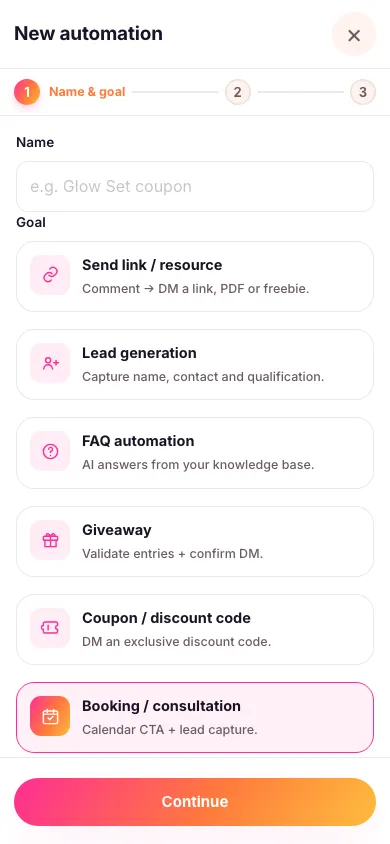
- Choose exactly which posts it replies to and pick your keyword. An automation only ever works on the content you attach to it — it never watches your whole account, so a comment on a post you didn't pick is left alone. You can also let people book by DMing you a word instead — see below.
- Add your calendar link and a short meeting description. This is what shows on the card people see in their DMs.
- Add up to 3 qualifying questions, if you want them. Turning this on asks a couple of quick questions — name, what they're looking for, anything that helps you prep — before the calendar link goes out. Leave it off to send the link straight away instead.
- Turn it on. Every matching comment now gets a booking card sent to their inbox, 24/7.

Let people book by DMing you a word
Give the automation a word in its DM routing keyword box — say BOOK — and anyone who messages you that word gets the booking card straight away, with no post or comment involved. "DM me BOOK" is a good line for a story or your bio.
Use a single word with no spaces. It has to be the whole message, but capitals and punctuation around it don't matter, so "BOOK" and "book!" both work while "book me in for next week please" doesn't. Each word can only belong to one automation in your workspace, so give every automation its own.
Everything happens in DM
A calendar card can't be posted as a public comment, so the Move conversation to DM switch stays on for this goal. All anyone else sees under the comment is a short public teaser — the card itself, and any qualifying questions, go privately to the person who asked.
If you turn on qualifying questions, the same permission conversation used for lead collection applies here too: an age check, a short notice saying what you'll use the details for and how long you'll keep them, and a button they have to tap to agree before anything is asked — if they'd rather not, they simply don't tap it and nothing is collected. When it's done, Zaptium sends them a link to their own private page where they can view what they shared, withdraw their consent, or ask for it to be deleted.
Every goal in Zaptium — not just this one — can also answer general questions using AI, grounded in your own content. If someone asks something instead of just commenting or messaging the keyword, turn on "Reply with AI" in the automation's setup and point it at a knowledge source.
What's next
Every completed booking shows up as a lead automatically — see understanding your leads to follow up on the people who booked.
Fill your calendar automatically
No card needed. Connect your account and go live in minutes.
Start free